

If you ask a group of authors what their writing process is like, chances are they’ll each have a slightly different path to completing their novel.
Some like to spend weeks or months in the research and planning process before they get started on their first draft, while others prefer to start with just a simple outline.
Whatever your preference, there are plenty of novel writing tools and software out there that can help you take your novel from the idea stage to a published novel.
Novel Factory is one of those tools, and in this post we’ll review the features, cost, and pros and cons of writing your novel with Novel Factory.
What Is Novel Factory?
Novel Factory is a novel-writing software that allows you to keep all your notes in one place, while also guiding you through the process of writing a carefully developed novel.
The software has a feature for pretty much every facet of the writing process, from worldbuilding, to detailed character development, to different plot templates based on genre.
And guiding the whole process is “the roadmap,” which outlines each phase, from laying out your premise, to writing your first synopsis, to actually writing, editing, and publishing your novel.
Who Is Novel Factory For?
Simply put, Novel Factory is for anyone who writes novels. And although it’s especially helpful for new writers, it’s not just for them—Novel Factory makes it clear that even experienced writers can increase their efficiency with this software while streamlining and organizing their process.
In fact, Novel Factory promises that even self-proclaimed “pantsers” can benefit from these resources, so it’s not just for dedicated planners either!
While it is possible for nonfiction writers to upload their own templates and take advantage of many of Novel Factory’s writing features, keep in mind that the software is very much geared toward fiction authors.
Features
So what exactly can you do with Novel Factory? Here are some of the software’s top features designed to make the writing process smoother for all levels of experience.
The Road Map
As previously mentioned, the “Road Map” is the main map that will guide writers from the ideation process to the publication of their book.
Each step or phase on the Road Map is accompanied by videos that explain the process of outlining, creating characters, extending your synopsis, and more. The guides (both written and in video) also offer examples from well-known books and movies.
Every step also has a wealth of advice for making the most of these resources, including tips for different kinds of writers (for example, those who prefer rigid outlines versus those who are more spontaneous).
To keep you on track, the guides for each step also have tasks for you to complete. (For example, after you’ve got your premise down, it’s time to start working on your plot. The task for this section, after you’ve read a few tips, is to go to the Plot Manager section, click the green ‘Add Plot Outline’ button, and choose a plot template.)

Outlines and Templates
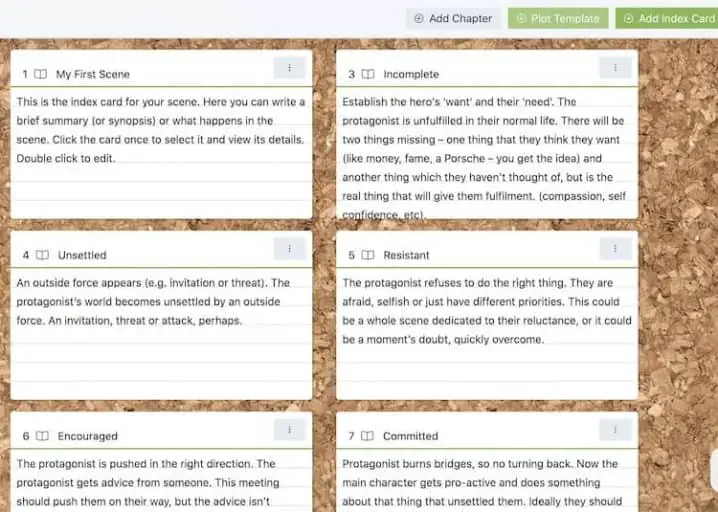
Once you’re ready to start outlining and planning your novel, you can head over to the “Plot Manager.” This section offers you virtual index cards to map out your scenes, which will then be available to you on the side panel once you’re ready to start writing.

There are 9 main templates to choose from.
These include:
- Character Driven
- Hero’s Journey
- Romance
- Mystery/Crime Thriller
- Horror
- Screenplay
- Detective Noir
- Universal
- Short Story
I selected the Character Driven template, which automatically generated this series of index cards for me to fill out:
Character Development
A story is only as good as its characters, and Novel Factory has a detailed system for helping you create dynamic, well-developed characters.
Once you create a character in the Characters section, you’ll be able to fill out a detailed profile, which can include the following information:
- Name, role, background
- Physical appearance details
- Voice details
- Personality type (you can even select a Myers-Briggs type)
- History
- Viewpoint synopsis
You can also upload an image or avatar of your character. And in addition to choosing one of the default character types (protagonist, nemesis, ally, supporting, etc.), you can create custom role types or archetypes to fit your story.
Worldbuilding
Novel Factory’s worldbuilding section is as detailed as its character creation features.
For every location, you can create an in-depth profile that includes all the basic information about that place, as well as the sights, sounds, smells, tastes, and sensations associated with it. Like the character profiles, you can also upload images.
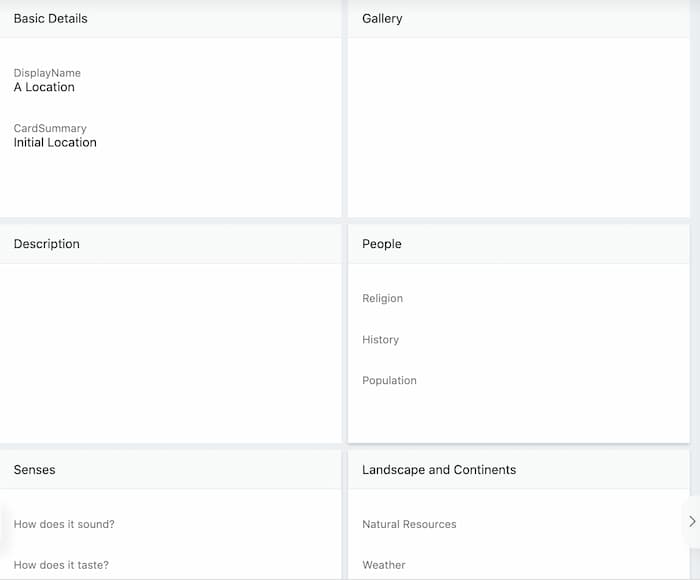
But you can take your worldbuilding miles deeper by filling out a questionnaire about the climate, population, government, and so much more. There are literally dozens of questions!
In addition to locations, you can also create cards for special items—maybe something the characters are on a quest to find, a murder weapon, or a Macguffin-type of object.
Scene Blocking
When it comes time to actually start writing your first draft, those scene “index cards” from your outline will come in handy.

The cards that you filled out for each key scene will show up on the side panel of the Manuscript section’s word processor, so you can stay on track and remember what needs to happen in each chapter or scene.
There’s even a subplot manager that can help you keep track of different threads within your main storyline.
Trackers
Novel Factory allows you track your daily and total word counts. You can also set up word count targets and view your word count by date or scene.
In addition to tracking your writing progress, you can also track the status of your submissions to literary agents and publishers, which is a pretty cool add-on for authors looking to go the traditional route.
Pros
- Detailed planning tools: Novel Factory’s planning tools are incredibly detailed, especially for character and setting development. The guiding questions really seem to cover every facet of these elements that you can imagine, which makes it perfect for writers who want to dive deep.
- Great advice for new writers: In addition to all the room for detail, every step of the Road Map is full of advice and guidance for new writers, breaking the process into manageable steps and making the road to publication feel less overwhelming.
- Fair pricing and good value: Unlike many other software tools, the only real difference between each pricing plan is the amount of storage and number of novels you can manage. This means you can start small and try out Novel Factory while writing one novel while still enjoying all the features, then upgrade your storage if you decide to continue using the software for other projects.
- Handy tracking tools: Novel Factory’s tracking features are what make this more than just a writing software. In addition to tracking your word counts and writing progress, you can keep track of your submissions to literary agents and publishers, which can be a great help to authors pursuing a traditional publishing deal.
- Can work anywhere: You’ll need internet access to utilize the online version, but as long as you’ve got that (or you’ve downloaded the desktop version), you can work on your novel anywhere, any time.
Cons
- Might be too detailed for some writers: What is a pro for some might be a con for others. I counted nearly 250 questions on the character profile. Of course, you don’t have to answer every question, but just seeing all those questions could be overwhelming or distracting to writers who don’t really care about their character’s favorite fairytale or when they last broke a promise.
- Online and desktop compatibility: Currently, there is no desktop version available for Macs, which means Mac users only have the option to work online. Novel Factory says they are working on this and hope to have a Mac desktop version this year. The browser and desktop versions do synchronize regularly, but only if you have an internet connection.
- Worldbuilding might not be ideal for fantasy writers: While the character and setting profiles probably have more than enough detail for most genres, sci-fi and fantasy writers might find the worldbuilding features a bit lacking, especially if you want to build out universes. You could make separate profiles for each, but there currently isn’t a way to organize multiple locations under one overarching location.
Pricing (billed monthly)
All of the Novel Factory pricing plans come with access to the same features mentioned in this post. The only real difference is how much storage you get and how many novels you can work on at once.
Here are the 3 Novel Factory pricing plans currently available. Note that you can pay less per month if you sign up for an annual plan (but this requires you to pay for the whole year at once).
Free 30-Day Trial
Novel Factory offers a free 30-day trial that you can sign up for without even providing a credit card.
This is a great way to explore the different features and get familiar with the software before upgrading to a paig plan, if desired.
Basic: $7.50/month
- Single novel
- 50 mb storage
You can also buy the Basic plan for a one-time annual payment of $75 ($6.25/month) if you choose to be billed annually.
Standard: $20/month
- Unlimited novels
- 500mb storage
You can also buy the Standard plan for a one-time annual payment of $198 ($16.50/month) if you choose to be billed annually.
Premium: $60/month
- Unlimited novels
- 5gb storage
You can also buy the Premium plan for a one-time annual payment of $600 ($50/month) if you choose to be billed annually.
Is Novel Factory Worth It?
Novel Factory has many beneficial features that guide writers of all experience levels through the novel writing process, but I’d say it’s especially helpful for new writers.
As someone who’s just begun experimenting with fiction writing myself, I found all the guidance and resources extremely helpful, as they broke down what could be an intimidating and overwhelming process into manageable steps. It’s also nice to have all your notes and drafts in one place.
More experienced writers may find all the tips, tools, and resources unnecessary, especially if they have their own writing process down.
Still, Novel Factory offers a 30-day free trial with no credit card required, so if you’re at all curious about the software, I definitely recommend trying it out, since there’s nothing to lose. After the trial, you can either subscribe to one of their plans, or try other great novel writing software, such as Plot Factory or Scrivener.
Did you find this post helpful? Let us know in the comments below!
If you enjoyed this post, then you might also like:
- Plot Factory Review: What It Is and How It Works
- First Line Generator Tools to Help You Start Your Story
- The Best Novel Writing Software: Tools Every Fiction Writer Should Use
- Evernote Review: Is This Note-Taking Tool Still Worth It in 2022?

As a blog writer for TCK Publishing, Kaelyn loves crafting fun and helpful content for writers, readers, and creative minds alike. She has a degree in International Affairs with a minor in Italian Studies, but her true passion has always been writing. Working remotely allows her to do even more of the things she loves, like traveling, cooking, and spending time with her family.
